
Create, open, edit and manage icon libraries in ICL format (the standard icon library format) – both 16-bit and 32-bit icon libraries are supported by GConvert.
Add, rename, edit or remove icons from your icon libraries directly with GConvert.
Drag icon files from Windows Explorer and drop them on GConvert to add them to your library.
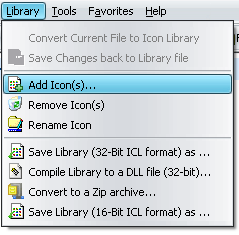
You can also compile icon libraries into true 32-bit DLL files (similar to the famous MORICONS.DLL file shipped with Windows). Resource DLL files made with GConvert are recognized by Windows (to change the icon of a folder for instance) and can be used in your applications too.
Directly convert your icon libraries to Zip archives ready to be delivered over the Internet. Zip archives may then be opened in any Zip archiver or better with GConvert, so you can directly view your icons without needing to unzip them first. And last but not least you can then resave your Zip archives into icon libraries (ICL files) using GConvert or compile them to DLL files.
