Working with GUnite |
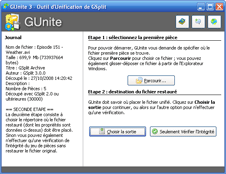
 If you did not create Self-Uniting pieces, you have to use GUnite, the unite tool shipped with GSplit, in order to join piece files together and restore the original file. GUnite offers you a graphical and easy-to-use interface: you have only to click some buttons and follow the given instructions in order to unite your piece files. Finally, GSplit can also perform an integrity check to detect whether pieces were not corrupted and that the file can be safely restored. If you did not create Self-Uniting pieces, you have to use GUnite, the unite tool shipped with GSplit, in order to join piece files together and restore the original file. GUnite offers you a graphical and easy-to-use interface: you have only to click some buttons and follow the given instructions in order to unite your piece files. Finally, GSplit can also perform an integrity check to detect whether pieces were not corrupted and that the file can be safely restored.
How to restore a file from pieces or perform an integrity checkLaunch the GUnite program. At the left side, you can see a text box which shows you instructions and the progression of the unite operation. Use the buttons at the right side to navigate through the required steps and unite your file.
Note: GUnite 3 is compatible with pieces made with GSplit 3, 2.x, 1.8 and 1.7. Piece integrity check is only available for pieces made with GSplit 2.x and 3.
|