AniTuner 1.1 - animated cursor tool

List of AniTuner features

animated mouse cursorAniTuner tries to be easy-to-use while including several features:

  • it opens and displays any animated cursor. AniTuner handles all cursor sizes (not only 32x32) & color depths (from 1bpp to 32bpp).
  • convert animated GIF, video for Windows AVI and AniTuner Disassembly files (.atd) into animated cursors (ANI).
  • import existing image files to turn them into cursors or animated cursors. AniTuner can import bitmap (.bmp), JPEG (.jpg), GIF (static or animated .gif), PNG (24 and 8-bit .png, including alpha channel optionally), cursors (.cur), icons (.ico), animated cursors (.ani) and Video for Windows (.avi).
  • export frames from your animated cursors to several image formats. AniTuner can export to bitmap (.bmp), JPEG (.jpg), GIF (.gif), PNG (.png, including alpha channel if 32-bit cursors), Adobe Photoshop® (.PSD - with alpha channel support for 32-bit cursors), Windows cursors (.cur) and icons (.ico).
  • modify existing animated cursors and change their color depth or size in one click! You can create non-squared animated cursors if you really want it.
  • if you want to use animated cursors on your Web pages, in your e-mails, documents or Flash movies, AniTuner converts them into animated GIF, video for Windows AVI (to be used with the Windows player control), static bitmaps or even compact Macromedia Flash SWF movies.
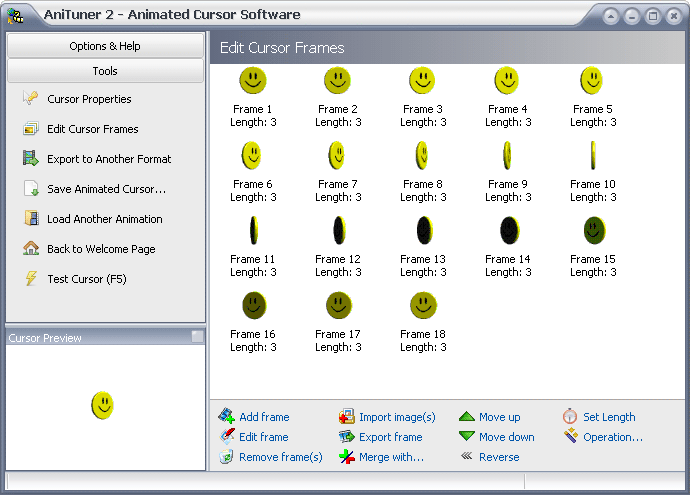
  • add, edit, move, copy, paste and remove frames, change their timing; modify them in your own favorite external image editor and then save changes back to the animated cursor in some clicks.
  • handles necessary color reduction and resizing internally if necessary.
  • special support for 32-bit cursors with a 8-bit alpha channel (partial transparency for Windows 2000/XP/2003 Server).
  • AniTuner can correctly draw 32-bit animated cursors even if you do not work with Windows 2000/XP/2003 Server.
  • turn your old 16 or 256-color animated cursors into 32-bit animated cursors with a semi-transparent shadow (Windows 2000/XP/2003 Server).
  • export (and import) animated cursors as a series of PNG files (with alpha channel optionally) for easy editing. All relevant  information related to the animated cursor is also stored in an AniTuner Disassembly file that you can edit with a text editor.
  • browse for animated cursors on your computer and preview them before opening in AniTuner.
  • create blank animated cursors and add new frames from existing image or cursor files.
  • merges several animated cursors into a single one.
  • shows live animated cursors while editing: all changes are immediately visible.
  • tests animated cursors by replacing the default mouse pointer during a short delay with your edited cursor.
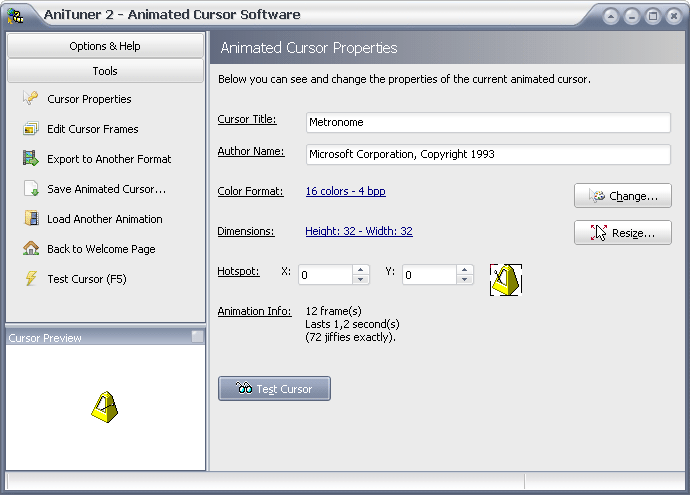
  • edits the title and author of the animated cursor (art information).
  • modifies the hotspot of the animated cursor.
  • optimizes animated cursors when saving them (identical frames will be saved only once).
  • includes a complete context-sensitive help file with screenshots and samples.
  • comes with several sample animated cursors ready to be used and edited.
  • features an easy-to-use XP-like interface that lets you visually edit and convert all of your animated cursors.
  • a true full freeware: no advertising, no "spyware", no restriction nor registration required.

Download AniTuner

View screenshots or the animated tutorial.

.: Need help about a function?

animated mouse pointer

AniTuner comes with a full context-sensitive help file. Just press F1 or click on the Help buttons to display the related help topic.

:: See the online help


.: Create XP cursors!

AniTuner can generate 32-bit animated cursors that are recognized by Windows 2000/XP and look semi-transparent thanks to the alpha channel.

:: Tell me more

  Copyright © G.D.G. Software 2008. All rights reserved.  | Top  | Contact  | Site map  | Search this Site Valid XHTML 1.0 Strict