
Powerful And Free File Splitter
This software is a fast and free file splitter that lets you split your large files, such as compressed archives, text and log files, backups, disk images, video and document files…, into a set of smaller files called pieces.
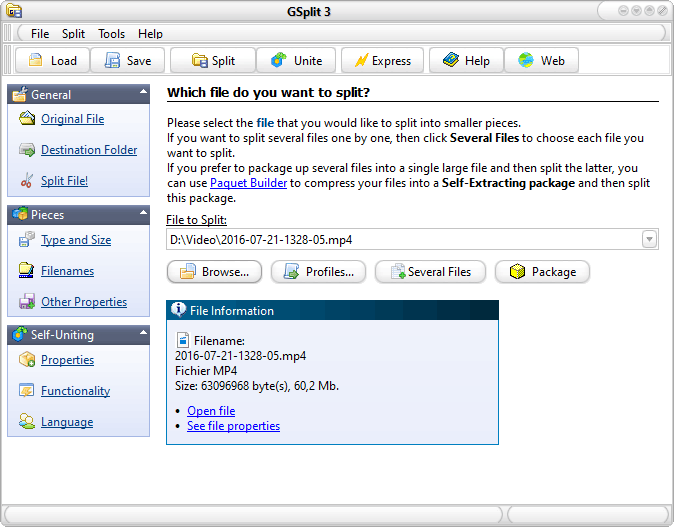
Lots of useful splitting features
GSplit is very fast and efficient: it even splits very large files, with sizes higher than 4 GB, without any problem.
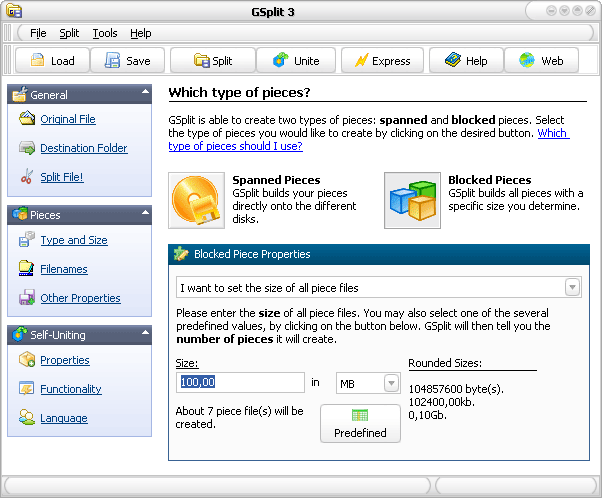
Disk spanned (split into a set of files varying in size auto-calculated by GSplit based on available free disk space and saved immediately to spannable removable disks) or blocked (split into a set of same sized split files). You may enter the size for each piece file, the number of pieces you want to obtain, or the number of lines/occurrences of a pattern by piece.
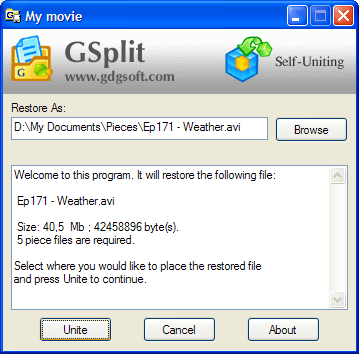
GSplit creates a small stand-alone executable file that will put all of the pieces back together. This executable provides your users with an intuitive Windows interface whose appearance can be customized according to your needs. Thus our free file splitter is not even required in order to restore the split file.
Perform fast checks (size, offset, CRC32) in order to detect file corruption and to give you the assurance that your files are successfully restored by your users. When a piece is corrupted, you are notified about it, so you just need to get a new copy of that piece, not the whole set.
File properties such as file dates and file attributes are stored into pieces, and restored automatically contrary to batch files.
Our free file splitter GSplit also offers batch and command line options for automation or build environments. Moreover, GSplit can work as a daemon and even split multiple files back-to-back in one time.
GSplit is Free!
GSplit is really a free file splitter: no advertisement, no restrictions, no nags.
No registration is required.
You can distribute, install and use it free of charge, even for commercial purposes.

Files split in pieces with GSplit are easier to
- upload and distribute over the Internet or networks.
- send by email (forget attached file size restrictions imposed by some ISP, SMTP and other e-mail servers).
- archive to CD, DVD, USB Flash drives and sticks, Zip disk, and any other storage device.
- copy to DVD, removable disks and even floppy disks.
- upload to file delivery services, online file hosting sites... that have restrictions on file sizes.
- share with friends, colleagues or other users through networks and the Internet.
- exchange using Instant Messaging clients or Instant Messenger programs...
A bunch of options for splitting files
GSplit is a generic free file splitter but it also offers dedicated options for splitting text and log files.
Split large text and similar files such as large server logs and other CSV files by number of lines or occurrences of a specified pattern. Optionally insert headers into each piece file.
Customize piece files according to your needs (size, filenames, title, author…), leave additional space on disks, create pieces without tags or with custom headers (useful for text-based files like large server log or CSV files).
Show you elapsed and estimated times while splitting and uniting files. You can also pause/resume the splitting operation.
Keep settings into profiles and let you use these settings for different files, remember MRU files and folders, automatically try to find out the best splitting settings…



View GSplit in action
This video tutorial shows you how to get started with our fast and free file splitter GSplit. It was especially made for people who wish to see how to split a file and join piece files together in some steps. It does not cover all features though.
All Features in GSplit
- Fast to split any file from any size (according to your computer configuration) including very large files (larger than 4 GB) or small files (< 100 kb).
- Possibility to write pieces directly to floppy disks (disk-spanned pieces) or in specified folders with specific size (blocked pieces).
- You can define a specific size for your pieces in bytes, KB, MB or GB; or choose one of the predefined values (1, 44 Mb – 2,88 Mb – 1 GB – CD – DVD – 10 Kb…). You can also add your own values to the list.
- You can also enter the number of pieces you want to create, both number of pieces and size of each piece… You actually have four modes to split your large file.
- Ability to create small Self-Uniting programs (SFU): this means that your end users can restore the original file without having GUnite (the program which joins pieces together). Your end users have just to insert the first disk and launch this executable file to rejoin all pieces together to restore the original file!
- The SFU program file only takes about 70 kb and features a real Windows interface (no console window nor batch processing, true GUI mode). It also supports uniting large files (see the first paragraph) and displays a progression with a log.
- The Self-Uniting Executable file can be fully customized (display prompt messages boxes & about message, run the restored file after uniting (useful if you want to run an installation or a Paquet Builder package), change the default icon and the version information resources, force it to work in background (all dialogs are hidden), check the integrity of the restored file to detect file corruption, choose a destination folder for the restored file, select which picture to display as the header (like a Windows wizard interface), localization is possible (multiple languages)...
- Distribute your files safely: GSplit uses three methods to check the integrity of the restored file: file size, offset and CRC32. Checks are very fast and efficient: when uniting a file, if a piece file is corrupted, GSplit will indicate you which one. So you can grab a new copy of this piece and not the entire set of pieces!
- Split large text files (server logs, CSV databases…) by number of lines or number of occurrences of a pattern.
- You can let GSplit decide for the size of your pieces with the disk-spanned piece type.
- GSplit tries itself to find out the best splitting options when you select a file & destination folder.
- You can determine the piece filenames using a mask. GSplit does not use the file extension to find the needed piece file (like PIE.001, PIE.002…). Your pieces can get names of your choice like DISK1.PIE, MYDOC PIECE 1.GSD, DISK001.DAT…
- You may keep extra free space on each disk or only the first disk.
- Insert additional customer headers in your piece files (useful to create smaller CSV or log files from larger ones).
- Unite your pieces and restore the original file directly from floppy or hard disks. You do not have to copy all pieces in a temporary folder and then run the uniting tool. SFU programs and GUnite prompt you to insert the next disk when required.
- You can pause/resume the splitting operation which uses a separate thread whose priority can be configured.
- GSplit displays elapsed and estimated times when splitting/uniting files.
- You can directly split your files directly from Windows Explorer: select the file you would like to split, then you have two ways:
- you can drag it from Windows Explorer and drop it on the GSplit’s main window.
- you can use the context menu (mouse right button click) and select the “Split file with GSplit” command.
- Save all settings and commands into profiles: you may create custom profiles and each time directly split your files with the configuration of your choice (you do not need to set the options each time). GSplit also can save profiles itself and manage a list of MRU profiles! When you select a file again, you can select the associated profile or similar ones.
- Do not waste time browsing for the same files and destination folders: GSplit can manage lists of MRU files and folders.
- Comes with Piece Inspector that tells you information about an orphan piece file for example.
- Nice and easy-to-use skinned interface. You can change the look according to your needs: several skins are available for download here.
- Split several files back-to-back in one time!
- Support for batch and command line options: you can automate GSplit and use it in your own scripts/applications. Moreover profiles can be customized how you want as they are XML files.
- Use our free file splitter GSplit as a daemon in automated batch files (silent options and exit codes are provided to detect possible errors).
- Compatible with Paquet Builder and HTML Executable.
- Includes GUnite, a stand-alone uniting tool in the case you don’t want to generate a SFU program. The size is enough small if you want to distribute it (285 kb!)
- GSplit is 100% freeware: no ads, no limitation, no registration required. There is no adware, spyware, time-bomb or malicious code at all: a real Freeware that you can use and distribute without any restrictions, even for Commercial use.
- Comes with a portable edition enough small to fit on a single floppy disk. No installation is required, no setting is written on the computer.
