We are pleased to announce that XLS Padlock 2026 is available as of June 12, 2026. This is a major release of our Excel workbook protection and licensing solution, and it lands alongside a completely rebuilt website and a new, easier to use documentation.
What XLS Padlock 2026 brings
This version is all about keeping your protected workbooks private and firmly under your control:
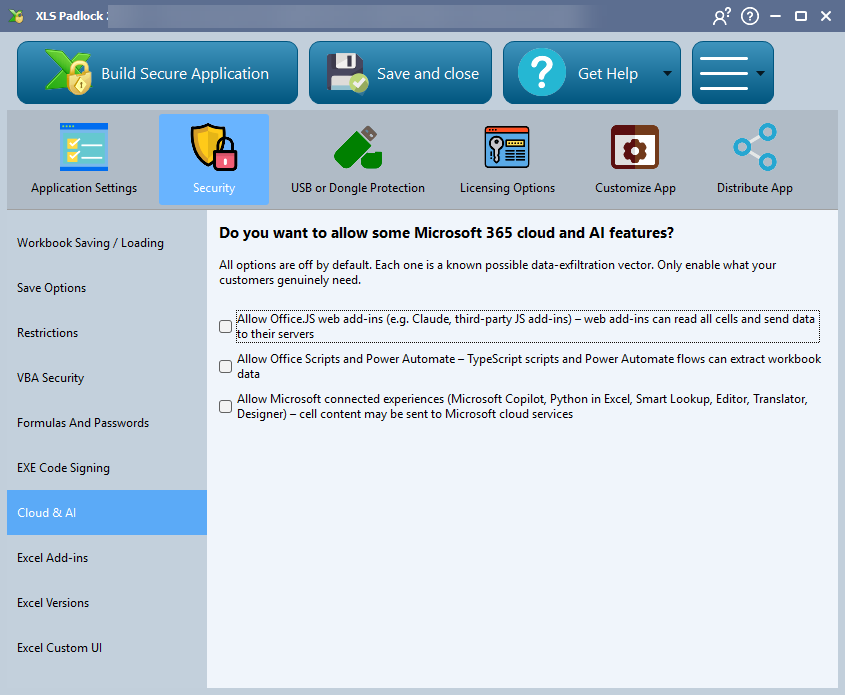
- More control over cloud and AI features. Recent Excel builds ship with web add-ins, automation, and connected experiences such as Copilot and Python in Excel that can read an open workbook. XLS Padlock 2026 blocks these in your protected application by default, then lets you re-enable, one by one, only what your customers genuinely need.
- Stronger built-in security. Save-file encryption and online activation have been reworked around modern cryptography, and the startup of every protected application has been hardened against tampering.
- Modernized internals. We replaced three long-standing third-party components with our own in-house engines, including a new multilingual system and a new VBA engine, for faster and more dependable protected applications.
- A fully branded, silent startup. You can now run your application entirely from your own forms, with Excel hidden from the very first moment, so it looks like your own software from start to finish.
The complete list of changes is in the online changelog.
A brand new website
We rebuilt www.xlspadlock.com from the ground up. The new site is faster, cleaner, and easier to navigate on any device, with clearer product pages..
New documentation, online and offline
The XLS Padlock documentation has been rewritten and is now fully integrated into the website. You can browse the entire user guide online, with search and direct links between topics, so finding the right information is quicker than before.
The same documentation is also built into the software: click Help or press F1 inside XLS Padlock to jump straight to the topic for the option you are working on. And if you prefer to read offline, the complete user guide is still available as a downloadable PDF.
Get XLS Padlock 2026
👉 Existing users with active maintenance can move to XLS Padlock 2026 free of charge. If your maintenance has expired, you can renew it at a discount.
👉 New to XLS Padlock? Download the free trial to protect a workbook from start to finish, or buy a license when you are ready.
- Visit XLS Padlock: https://www.xlspadlock.com
- Read the documentation online: https://www.xlspadlock.com/doc
- Download the PDF user guide: https://download.xlspadlock.com/XLSPadlock-Guide.pdf
- Download the free trial: https://www.xlspadlock.com/download
- Buy XLS Padlock: https://www.xlspadlock.com/store
- See the full changelog: https://www.xlspadlock.com/doc/changelog
