
VBA Padlock 2026.2 is now available, and it changes the way you protect your macros. Until now, you brought your sensitive code into VBA Padlock yourself. From this release on, you simply open your existing Excel, Word, PowerPoint or Access file and let VBA Padlock do the work: it reads your macros, compiles them, and hands you back a protected copy ready to ship. If your maintenance plan is active, it is a free upgrade.
New to it? VBA Padlock is our VBA protection solution for Microsoft Office. Instead of hiding your macros behind a password that modern tools crack in seconds, it compiles them into native 32-bit and 64-bit DLLs, so the logic you spent years refining never ships as readable text. It also adds licensing, trials, hardware locking and online activation to the Office files you sell.
Protection in Three Steps
The new workflow is short enough to describe in one sentence: open, review, produce.
- Open your macro-enabled document. VBA Padlock pulls the macros out of the file (they stay disabled while it reads) and analyzes them straight away.
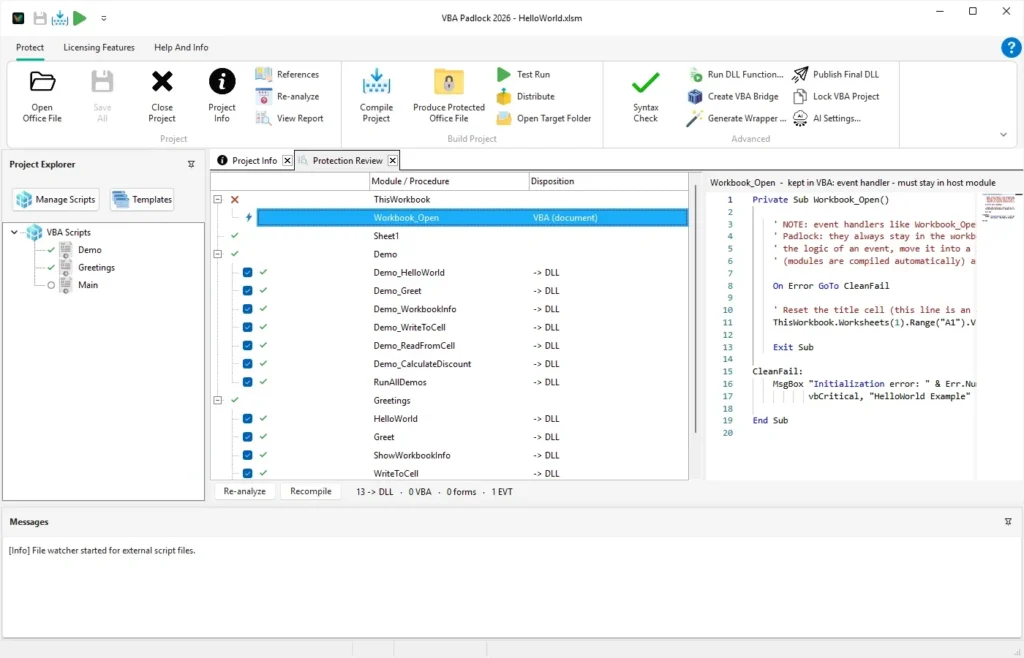
- Review the result. The new Protection Review lists every module and procedure and tells you what happens to it, and why: this one moves into the compiled DLL, that one has to stay in the document because Office needs it there. Disagree with a decision? A checkbox overrides it.
- Produce the protected file. One click, and you get a protected copy of your document. Your original is never touched.
The important part is what does not change: your buttons, your event handlers and your worksheet formulas keep calling the same procedure names, so everything behaves exactly as before. Open the VBA editor in the protected copy and you will see the difference: the logic is simply not there any more. A Test Run shortcut produces the file and opens it directly in Office, so you can check the result in seconds.
More of Your VBA Compiles
Real-world VBA projects are rarely made of simple procedures, so the compiler has grown to match. VBA Padlock 2026.2 now handles class modules, which are removed from the document altogether once compiled, making them the natural home for your most valuable code. Collections, user-defined types, conditional compilation, multi-dimensional arrays and a long list of additional built-in functions are supported as well.
A new References dialog compiles the symbolic Office constants you already use, from xlUp to wdFormatPDF, directly into your DLL, with the right libraries pre-selected for the application you are working with. In practice, most existing code now compiles without any rewriting.
Scripted and AI-Driven Builds
If you rebuild protected files regularly, VBA Padlock can now run without showing its window, driven from a script or from an AI assistant such as Claude, ChatGPT or Gemini through its built-in MCP server. Opening a project, editing modules, building the DLLs and packaging a distribution archive can all be automated.
Also in This Release
- A unified interface, with a dedicated Protect ribbon tab and protection markers shown next to each procedure in the editor.
- Reworked example projects for Excel, Word, PowerPoint and Access, one click away from the Welcome screen.
- A per-module lock, so a hand-tuned module is never overwritten by a fresh analysis.
- Clearer distribution safety: the Distribution tab tells you which file will actually ship, and warns you before you send out an unprotected one.
- Runtime dialogs (activation, licence agreement, trial) now scale correctly on high-DPI displays.
- Several compiler fixes, including error handling and locale-dependent number checks.
👉 See the full changelog for the complete list of changes.
Upgrade or Try It
VBA Padlock 2026.2 is a free upgrade for customers with an active maintenance plan. Registered users can get it straight away with Check for Updates in the Help And Info tab. If your maintenance has lapsed, renewing it unlocks 2026.2 and every release after it. Never tried VBA Padlock? The free trial gives you the complete environment, protected files included.