
 GConvert
Getting Started with GConvert
Before you begin, please read the following important paragraphs. You can also find some interesting notes in the "Frequently Asked Questions" topic.
To open an icon resource file (a file that may contain icons):
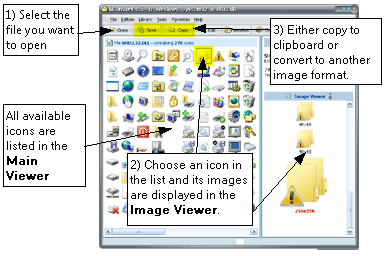
The following files containing icons may be opened in GConvert:
- executable files (EXE, DLL, OCX, VBX, DRV, SCR...)
- icon library files (ICL, IL, NIL, DLL)
- Windows® and Macintosh® icon files (ICO, ICNS, RSRC)
- Windows cursor files (CUR)
- Zip archives (ZIP)
Example: on Windows, some interesting files are C:\Windows\System32\shell32.dll or moricons.dll.
You can browse for hidden icons on your computer: in the Icon Browser expert, you select a folder in a explorer-like folder list and GConvert will open each file found in this folder and then it will display extracted icons in a list.
Finally you can easily create icons by importing existing image files: GConvert supports generating icons of any format (height, width and color depth) and including several images in one output icon file.
Do not hesitate to visit the section "How do I ... ?": it contains several help topics with instructions about some useful operations to be done with GConvert.