
 GSplit
Languages
GSplit 4 speaks English and eight other languages. The same translation catalog serves the window, the messages of the program, the consoles gsplitc and gunitec, and GUnite.
Available languages
Section titled “Available languages”| Language | Code | Name shown in Options |
|---|---|---|
| English | en | English |
| French | fr | Français |
| Spanish | es | Español |
| Italian | it | Italiano |
| Catalan | ca | Català |
| Bulgarian | bg | Български |
| Korean | ko | 한국어 |
| Simplified Chinese | zh_CN | 简体中文 |
| Traditional Chinese | zh_TW | 繁體中文 |
English is the source text and has no catalog. The Windows installer itself exists in English, French, Spanish, Italian and both Chinese languages; with Bulgarian, Catalan or Korean you get the installer in English and GSplit in your language.
Change the language
Section titled “Change the language”Open Tools > Options…, then on the General tab choose Language of GSplit. The first choice, Automatic, names the language GSplit finds from your system. GSplit reloads its window in the new language and keeps the current settings. The setting is available when no split, unite or checksum is running.
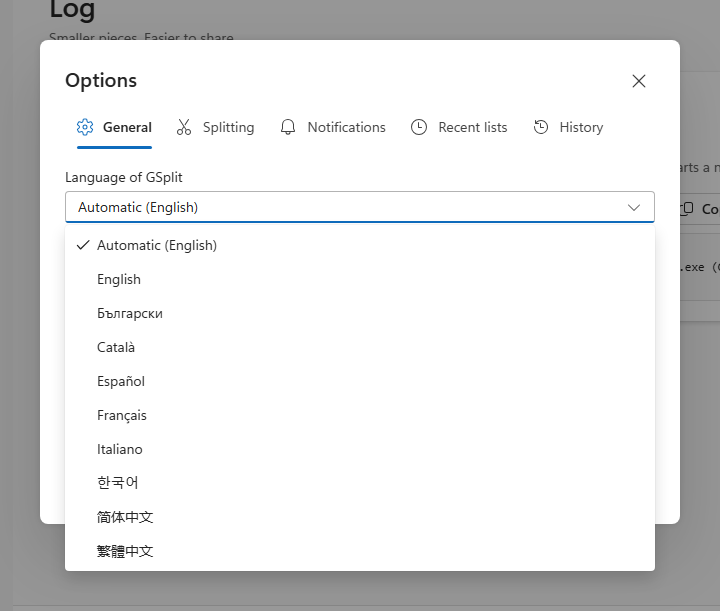
A language whose catalog is incomplete shows the share of translated texts, for example (80% translated). Untranslated texts appear in English.
How automatic language selection works
How the language is chosen
Section titled “How the language is chosen”GSplit takes the first of these that applies:
- The
--lang <code>switch of the console programs and ofGSplit.exewith switches. - The language set in Options.
- The display language of the system. On Windows installed from
gsplits.exe, the first start uses the language chosen in the installer.
A code finds its catalog by the full code, then by the language alone: fr_CA uses fr. Chinese goes by script: zh_TW, zh_HK and zh_MO use Traditional Chinese, other Chinese codes use Simplified Chinese. Without a catalog, GSplit uses English.
gsplitc --lang fr --versionGUnite and the Self-Uniting app
Section titled “GUnite and the Self-Uniting app”A Self-Uniting app can carry its own language file, see Self-Uniting: Language. Without one, GUnite takes the language of GSplit. --lang on its command line wins over the language file.
Contribute a translation
Translate or correct a language
Section titled “Translate or correct a language”The catalogs are plain text files next to the program:
locale/<code>/LC_MESSAGES/default.po one catalog per language, UTF-8To correct a translation, edit the .po file of the language with a text editor or with Poedit, and restart GSplit. To add a language, copy the default.po of an existing language to locale/<code>/LC_MESSAGES/default.po, set the Language: and Plural-Forms: lines of its header (Poedit does it for you with "Create new translation"), and translate every text. A header line X-Language-Name: gives the name shown in Options.
To report a translation error, see Contact information.