
 GSplit
Piece inspector
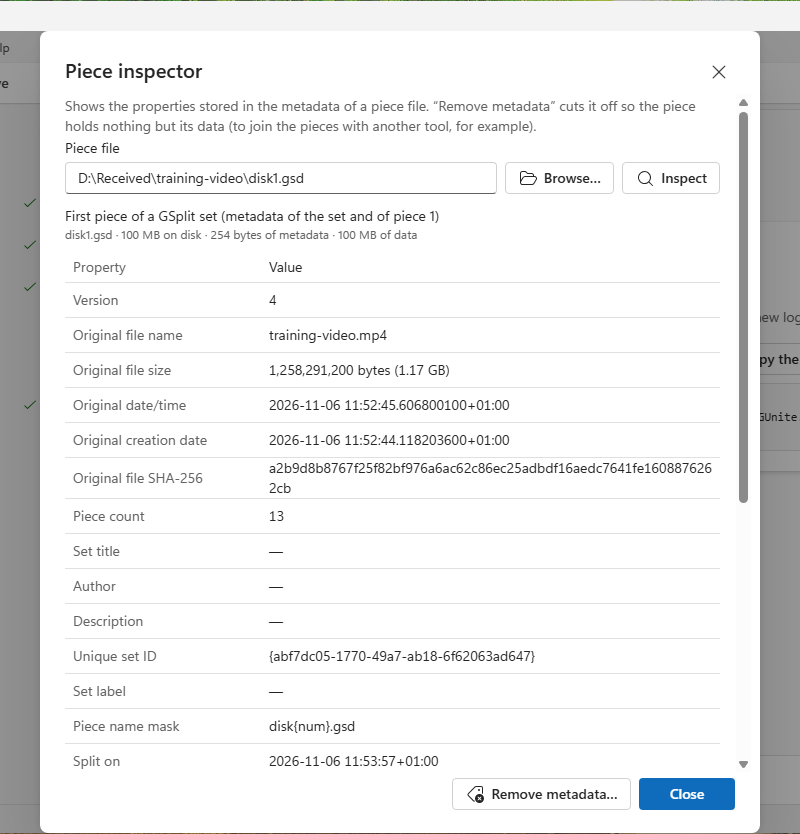
The Piece inspector shows what one piece says about itself: the file it comes from, the set it belongs to, its place in that set and its checksums. It can also remove that information from the piece.
Open it from Tools > Piece inspector… in the menu bar.
Inspect a piece
Section titled “Inspect a piece”Type or paste the path of a piece in Piece file, then select Inspect, or choose Browse… to pick it. The dialog reads pieces written by every version of GSplit.
What the dialog shows
Section titled “What the dialog shows”A summary line tells what GSplit found:
- First piece of a GSplit set, or Piece 2 or later of a GSplit set: the table below lists its properties.
- No GSplit metadata at the end of this file: the file is not a GSplit piece, or it was written without metadata (raw pieces such as
.001, and GSplit 1.x pieces). - The metadata of this piece is damaged: the piece changed since it was written. Get it again.
Piece properties
Section titled “Piece properties”The table gives the name, size and dates of the original file and its SHA-256, the number of pieces, the set title, author and description entered on Other properties, and, for this piece, its number, its size, where its data sits in the original file and its CRC-32. A value that was not recorded shows a dash.
The byte layout behind these properties is described in Piece format V4 and Legacy piece formats.
Remove metadata
Section titled “Remove metadata”Remove metadata… cuts the metadata off the end of the piece, so the file holds only its data. Use it to join pieces with another tool such as copy /b or cat. GSplit asks for confirmation first.